Backup4Mail app icon

In development

Backup4Mail by robspace

Your whole mailbox. Every point in time.

Backup4Mail backs up complete IMAP mailboxes from your mail server into a folder you choose – on your Mac, an external drive or a NAS. After the first run it only fetches what has changed. Every backup becomes a point in time you can travel back to, restore and export.

For Mac · macOS 26 or later

Coming to the Mac App Store Privacy policy
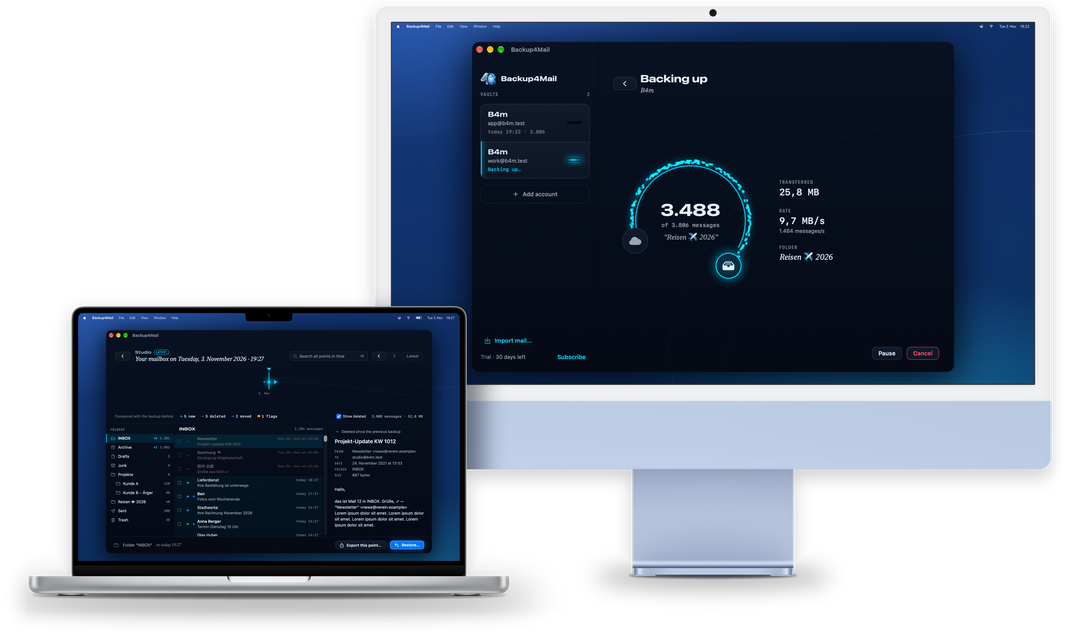
Backup4Mail on a MacBook Pro and an iMac: in front, time travel shows a mailbox as it was at one point in time, with new, deleted and moved mails marked; behind it, a backup is running
How it works

From the cloud, along the arc, into the drawer.

The logo tells the whole story: your mail travels from the server into a drawer that belongs to you. What sits in the drawer rests safely. What moves is light.

  1. Your mailbox

    Backup4Mail connects directly to your mail server, always encrypted, and only reads. Backing up marks nothing as read and moves or deletes nothing.

  2. One turn per backup

    The first backup copies everything. Every later one fetches only what is new, gone or changed – folders run side by side over up to three connections.

  3. Your vault

    A folder on your Mac, an external drive or a NAS. Mails are stored as EML (one file per mail) or MBOX (one file per folder), with a README that explains the layout. What you delete on the server stays in the vault unless you switch on thinning.

Features

Everything a mail backup needs, nothing it doesn’t.

01

Time travel

Every backup is a point in time. Turn the time ring and see your mailbox exactly as it was then: folders, mails, read and flagged status. New mails, mails deleted since and moved mails are marked. The search finds subject, sender, recipients and preview across all points in time.

Time travel
02

Back up – then only the changes

Add an account with its email address: for well-known providers Backup4Mail fills in the server itself, otherwise it asks your provider’s domain. The password goes into the keychain of this Mac. The first backup copies everything, every later one only the changes. The orbit shows how far it is: mails, size, rate and the folder being backed up.

Back up – then only the changes
03

Restore without duplicates

Restore a whole point in time, single folders or single mails – into the original account or another one, into the original folders or a separate folder. A dry run shows first how many mails are already there and how many will be uploaded. Flags and received dates are kept.

Restore without duplicates
04

Export into open formats

Export any point in time as MBOX, MBOX for Apple Mail, EML folders, Maildir, PST Beta or HTML archive – a searchable offline website that any browser can open, no mail app needed.

Export into open formats
05

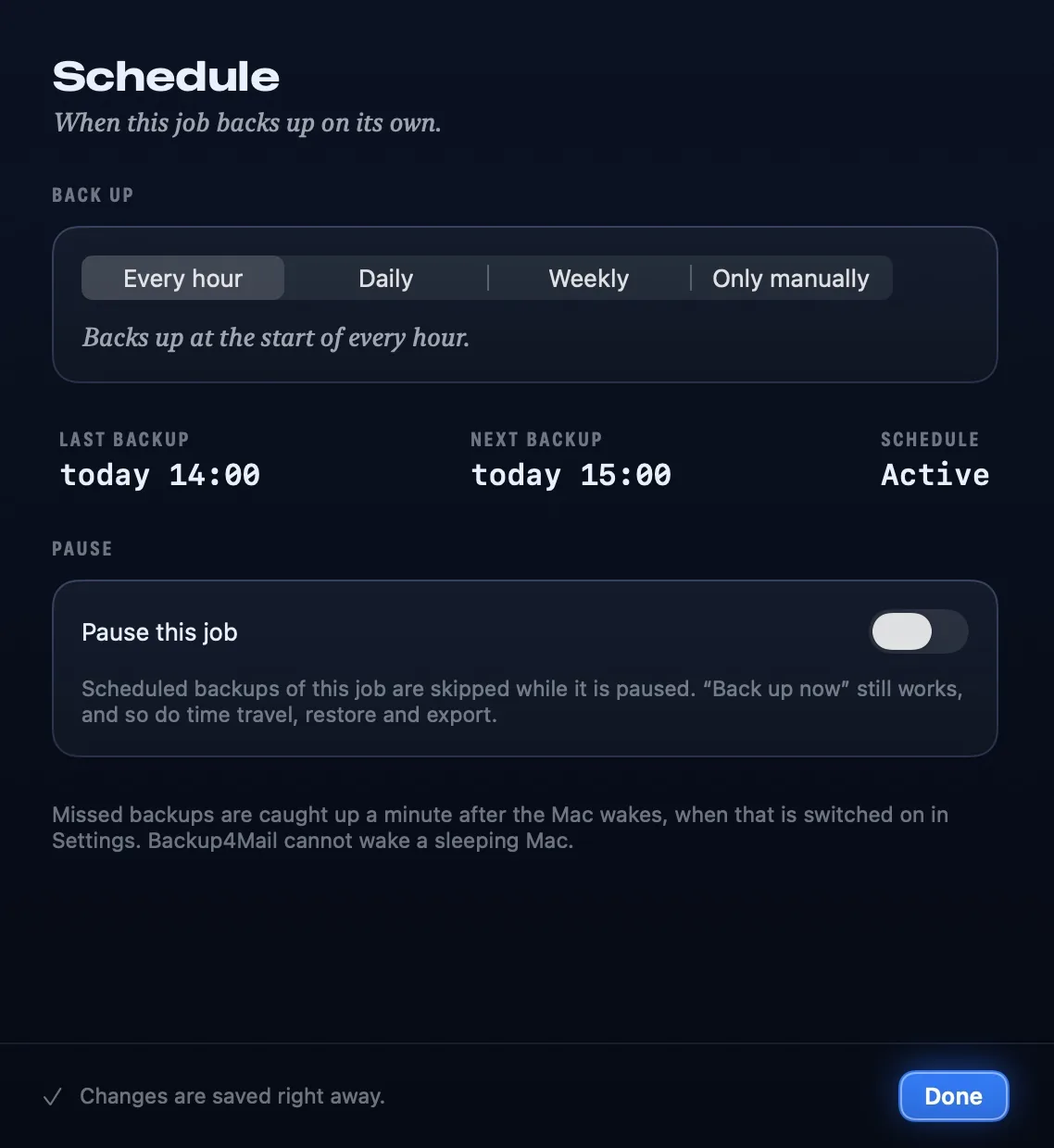
Backup jobs with their own schedule

Every account at a destination is a backup job: every hour, daily at a set time, weekly or only manually. With the window closed, Backup4Mail keeps working from the menu bar, and if you switch it on, it opens at login. Missed backups are caught up a minute after the Mac wakes; a sleeping Mac it cannot wake.

Backup jobs with their own schedule

More in the cabinet

Formats

Your mail stays readable – with or without Backup4Mail.

Every format can be combined with every other: back up as EML, export as MBOX, import a PST into an IMAP account.

FormatVaultExportImport
EMLOne file per mail in a folder tree. Drag into any mail app, open with Quick Look.✓yes✓yes✓yes
MBOXOne file per folder. Thunderbird, mutt and most mail apps import it.✓yes✓yes✓yes
MBOX for Apple MailMailbox packages that Apple Mail opens via File › Import Mailboxes.–no✓yes–no
MaildirThe server standard of Dovecot and mutt; flags are kept in the file names.–no✓yes✓yes
PST BetaOutlook data file for Outlook on Windows and Mac.–no✓yes✓yes
HTML archiveA searchable offline website. Readable in any browser in 30 years, no mail app needed.–no✓yes–no
Apple MailMail folders from Apple Mail (.mbox packages with .emlx).–no–no✓yes
Price

Your mail is never held hostage.

  1. 30 days free

    Try everything, without payment details.

  2. Then Backup4Mail Pro

    Monthly, yearly or once for a lifetime – through the Mac App Store.

  3. Always free

    Restore and export stay free, also after the trial – your mail never gets locked away. New backups and time travel need Pro.

Privacy

Between your mail server and your vault there is nobody.

Read the privacy policy

Frequently asked questions

Can I buy Backup4Mail yet?

Not yet. Backup4Mail is in development and is being tested. This page describes the current test version.

Which mail accounts work?

IMAP accounts, for example iCloud Mail, Fastmail, GMX, web.de, Posteo, mailbox.org or a mailbox at your own domain. Gmail works with an app password.

Do I need a NAS?

No. A vault can be any folder you can choose on your Mac: the internal drive, an external drive or a network share (SMB, AFP, NFS).

Can I read my backups without Backup4Mail?

Yes. The mails are EML or MBOX files that Apple Mail, Thunderbird, Outlook and many other programs read. A README in every vault explains the layout.

Does a backup change anything on my mail server?

No. Backing up only reads: nothing is marked as read, moved or deleted. Only a restore adds mails, and only the ones that are missing.

What happens when the trial ends?

Your vaults stay as they are. Restore and export remain free; new backups and time travel need Backup4Mail Pro.

What does “Beta” mean for PST?

Backup4Mail reads and writes Outlook’s PST format with its own implementation. Until it has been checked against many real Outlook files, it is marked as Beta.

Support

Questions, ideas or a bug? Write to support@robspace.de.